
Tesla Delivery Day Checklist (2026)
51 checks to go through before you accept your new Tesla. Tick them off here as you go — they stay saved in this browser.
Before you go
- Bring your order agreement (printed or a photo) and any payment or financing documents you were asked for.
- Charge your phone and install the Tesla app, signed in to your account.
- Plan to arrive in daylight if you can — paint and panel issues are hard to see under artificial light.
- Take your time. Inspect the car before you sign anything, and don’t let anyone rush you.
Paint & Body 3 checks
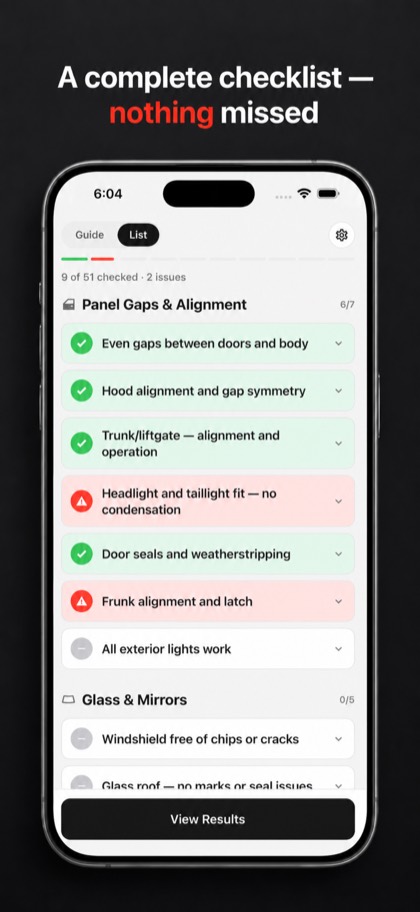
Panel Gaps & Alignment 7 checks
Glass & Mirrors 5 checks
Interior 9 checks
Do this on your iPhone with TSL Check
- Swipe through every check and mark OK or Not OK
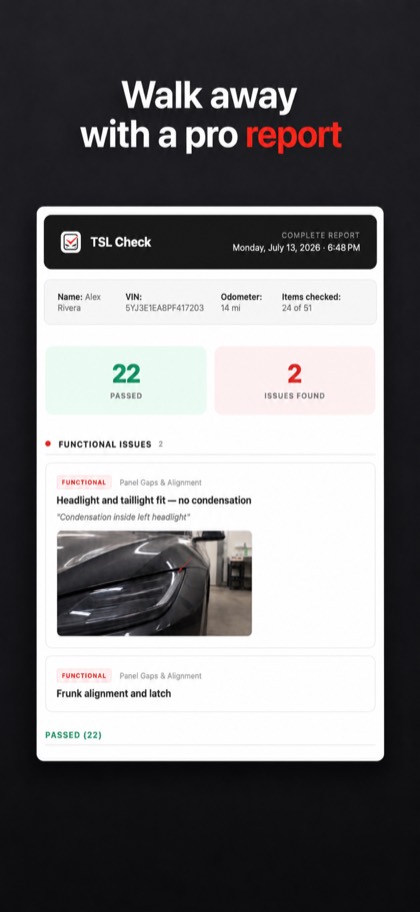
- Attach a photo and a note to each problem
- Share a PDF report with Tesla or your Service Center
- Plus: how to inspect each item, real defect photos, and checks for your model
Screen & Software 6 checks
Cameras & Sensors 5 checks
Wheels & Tires 3 checks
Charging 3 checks
Test Drive 6 checks
Documentation 4 checks
Found a problem?
- Photograph it — once close up, once from further away so the location is clear, and once with the VIN.
- Write it down on the delivery paperwork before you sign, and ask the advisor to note it.
- Report cosmetic issues early. The sooner after delivery you raise them, the more likely they are to be covered.
- For serious defects (safety items, the car not charging, a VIN mismatch), you can generally decline delivery until it is fixed — check your contract.
Do this on your iPhone with TSL Check
- Swipe through every check and mark OK or Not OK
- Attach a photo and a note to each problem
- Share a PDF report with Tesla or your Service Center
- Plus: how to inspect each item, real defect photos, and checks for your model
Frequently asked questions
What should I check when picking up my new Tesla?
Walk through paint and body, panel gaps, glass, the interior, the touchscreen and software, cameras and sensors, wheels and tires, charging, a short test drive, and the paperwork. This page lists 51 checks in that order.
Can I refuse delivery of a Tesla if I find a defect?
In many markets you can decline delivery when there is a significant defect, such as a safety issue, a car that will not charge, or a VIN that does not match your paperwork. The exact rules depend on your contract and country, so read your order terms.
Is there a Tesla delivery checklist PDF?
The TSL Check app for iPhone turns this checklist into a PDF report with your own photos and notes of each problem, ready to send to Tesla or your Service Center.
What should I bring to Tesla delivery day?
Your order agreement, any payment or financing documents you were asked for, and a charged phone with the Tesla app installed and signed in.
How long should a Tesla delivery inspection take?
As long as you need. Go through every item calmly before you sign; small cosmetic issues are easy to miss when you feel rushed.